
Mptaas scholarship status check Online
You can check your MPTAAS scholarship status online in a few minutes. Just open the portal, log in, and see your updates. This guide helps you understand every status and every step. You can track your scholarship progress with confidence. Stay informed and avoid confusion using the portal.
Payment structure for the Scholarship
This table shows the amount given to the students of different classes.
|
Education Level / Course |
Day Scholars (₹ per month) |
Hostellers (₹ per month) |
|---|---|---|
|
Pre-Matric (Class 9–10) |
₹150 – ₹250 |
₹300 – ₹500 |
|
Post-Matric (Class 11–12) |
₹230 – ₹380 |
₹380 – ₹1,200 |
|
Graduate Courses (BA, B.Sc, B.Com) |
₹300 – ₹570 |
₹570 – ₹1,200 |
|
Professional / Technical Courses |
₹550 – ₹1,200 |
₹1,200 – ₹2,300 |
|
Medical / Engineering / Management |
₹1,000 – ₹1,500 |
₹2,000 – ₹2,500 |
How to Check MPTAAS Scholarship Status Online?
You can check your scholarship status in a very simple way. The method is same for both portal and MPTAAS app. Just follow these steps, stay calm, and move one step at a time.
Step 1: Open the Official MPTAAS Portal
Take your phone or laptop and open your browser. Go to the official website.
Step 2: Log in to Your Student Account
Enter your registered username and password. If you forget your details, use the “forgot password” option and recover your login.
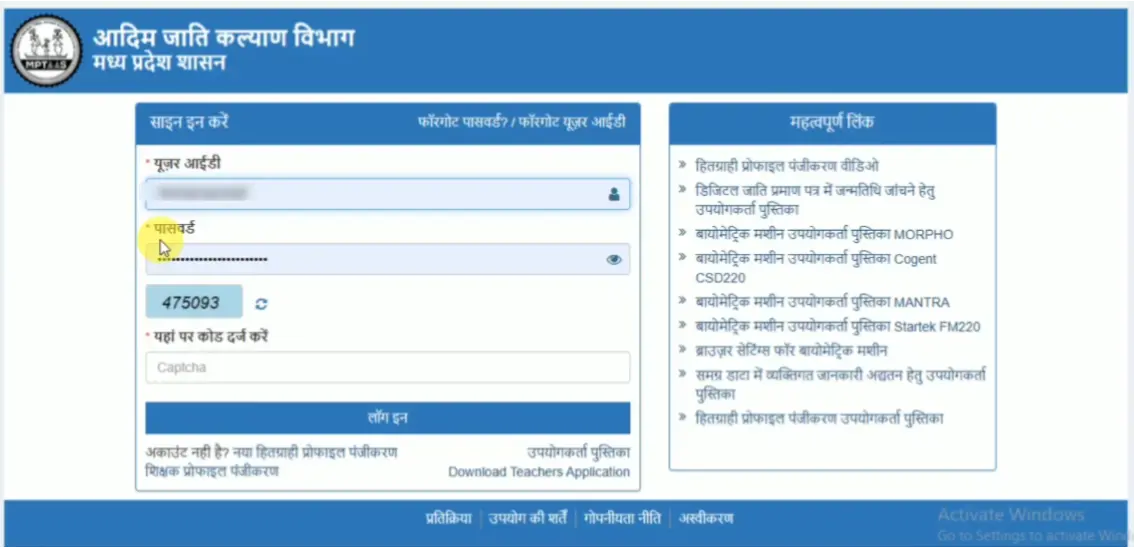
Step 3: Go to the ‘Application Status’ Section
After logging in, look at the menu and select the option that shows your application status. Every student can find this option easily on the dashboard.
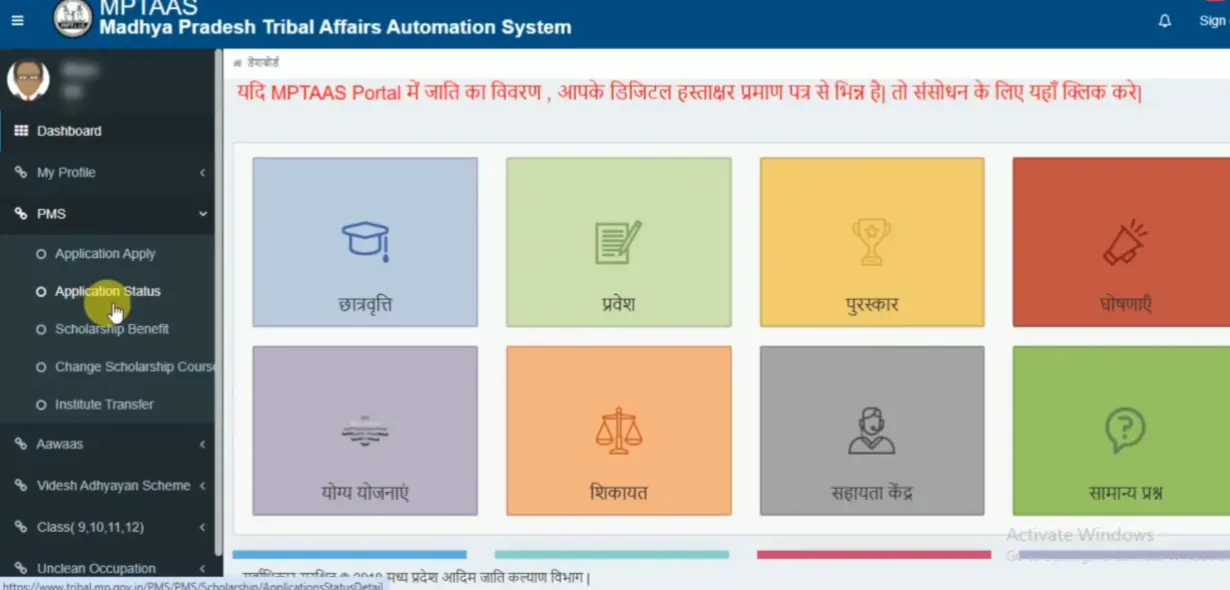
Step 4: Check Your Current Status
Your screen now shows your latest scholarship update. It may show “Under Scrutiny,” “Approved,” “Rejected,” or “Sent to Treasury.” Each status tells you the current stage of your application.
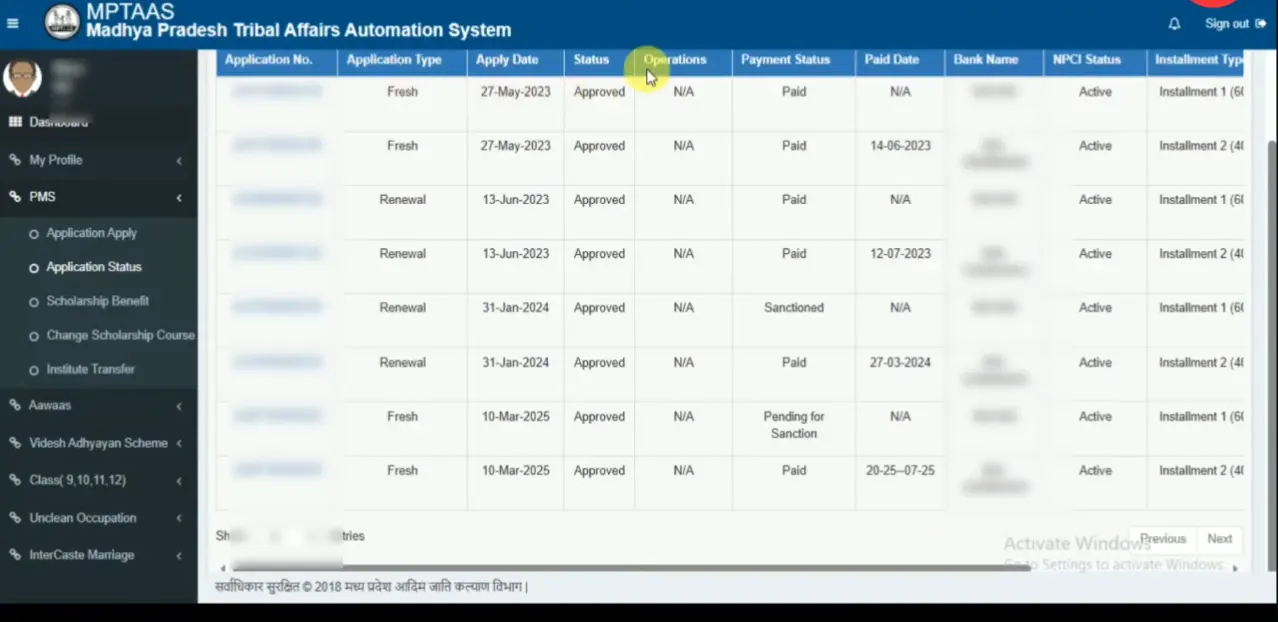
Step 5: Read the Details Carefully
Look at the date, level of approval, and remarks. If the portal shows any remark, note it down and fix the issue.
Step 6: Log Out After Checking
Once you confirm everything, log out of your account to keep your information safe.
Understand Your Application Status Meaning
When you check your application or MPTAAS renewal status, you may see different updates on the screen. Each update shows what happens to your application at that moment. Let’s understand these meanings in a simple way so you never feel confused.
Under Verification
The department reviews your details. The team looks at your documents, your income, your caste certificate, and all other information. You don’t need to worry because this stage normally takes some time.
Pending at District Office
Your file reaches the district office. The staff verifies your data and matches it with the rules. This step helps the department confirm that everything fits the scholarship guidelines.
Approved
The department checks your information and accepts your application. This means you will receive your scholarship amount soon. You don’t need to take any action here. Just stay updated.
Rejected
The department finds an issue with your form or your documents. You can open the remarks section and read the reason. You can correct the mistake and apply again in the next cycle.
Sent to Treasury
Your application moves to the treasury for the final payment step. This is the last stage. The department will transfer your scholarship amount to your bank account after this step.
Payment proceeded
Your scholarship amount moves to your bank account. You can check your bank SMS or passbook to confirm the transfer.
Latest Updates on MP Scholarship Status and Payment Release
The portal now shows faster MP scholarship status updates, and many students transition from “Under Scrutiny” to “Approved” quickly. Payments are released in batches, and students with status “Sent to Treasury” see their money soon. The departments also clear old pending applications, so you can check your dashboard regularly for fresh updates.
Many students receive scholarship funds within a few weeks after approval. The government works to complete verification and payments on time. They try to release funds before exam or admission deadlines. Stay alert — when a new payment batch begins, you might see a portal notice or message; then check your bank account soon after.
Troubleshooting: Common Issues & Solutions
Sometimes, the portal shows problems during the MP scholarship status check. Do not worry, because you are not alone. Many of us face these common issues. Here are the common problems and their easily understandable solutions.
Aadhaar Not Verified
Problem: The portal shows “Aadhaar not linked”.
Solution: Check your bank and Aadhaar linking. Correct your name or mobile number if both do not match. Ask the bank to update your Aadhaar link.
Wrong Password
Problem: You forget your password or mix capital and small letters.
Solution: Try again slowly. If you still cannot remember, click “Forget Passwod” and make a new one.
Status Not Showing
Problem:
You log in, but the status does not appear.
Solution: Refresh the page.
Clear the browser cache.
Try again after some time because the server may busy sometimes.
Page Not Loading
Problem: The website does not open. This maybecause of slow internet.
Solution: Check your internet. Try again after one minute or use a better network. Restart your device and try. Sometimes, slow internet may cause issues.
Bank Account Error
Problem:
The portal says “bank account not valid”.
Solution:
Check if your bank account works.Check the IFSC code. Correct your bank details in the portal. Visit your bank and get help.
Application Rejected
Problem: The portal shows “application rejected”.
Don’t worry, I faced this issue many times.
Solution: Read the reason shown on the screen.Upload the correct documents. Apply again during the correction time.
Frequently Asked Questions
Conclusion
The MPTAAS scholarship status helps every student check their application and payment in a quick and simple way. You just open the portal, log in, and see your updates anytime. This Support gives students confidence, keeps their studies smooth, and makes the whole process easy to follow without any stress.